도서관 도서 관리 사이트 만들기
✒️ 2025-07-06 22:16 내용 수정
실습 목표
- 도서 관리 시스템을 만들어 CRUD 기능과 보안 기능을 구현한다.
- Book Entity 정보
| 이름 | 타입 | 설명 | 비고 |
|---|---|---|---|
| bookId | int | 도서 ID | 기본키, 자동 증가 |
| title | String | 도서명 | 필수, 최대 200자 |
| author | String | 저자명 | 필수, 최대 100자 |
| price | int | 가격 | 필수, 0 ~ 1000000, 숫자만 |
| publishDate | Date | 출간일 | NULL 허용 |
| description | String | 도서 설명 | NULL 허용, 최대 1000자 |
| createdAt | Timestamp | 등록일시 | 자동 생성 출간일은 YYY-MM-DD |
| updatedAt | Timestamp | 수정일시 | 수정 시 자동 업데이트 |
- 보안 요구 사항
- XSS 방지를 위한 입력값 이스케이프 처리
- SQL Injection 방지를 위한 PreparedStatement 사용
- 입력값에 길이, 형식, 특수문자 체크
- CSRF 토큰 적용
프로젝트 설정
의존성
- JSP, JSTL 의존성을 추가하여 JSP 설정을 적용한다.
- PostgreSQL 의존성을 추가하여 데이터 베이스 연결을 설정했다.
<!-- JSP API -->
<dependency>
	<groupId>javax.servlet.jsp</groupId>
	<artifactId>javax.servlet.jsp-api</artifactId>
	<version>2.3.3</version>
	<scope>provided</scope>
</dependency>

<!-- JSTL -->
<dependency>
	<groupId>javax.servlet</groupId>
	<artifactId>jstl</artifactId>
	<version>1.2</version>
</dependency>

<!-- PostgreSQL JDBC Driver -->
<dependency>
	<groupId>org.postgresql</groupId>
	<artifactId>postgresql</artifactId>
	<version>42.6.0</version>
</dependency>
디렉터리 구조
library/
├── src/
│   ├── main/
│       ├── java/
│       │   ├── dao/
│       │   │   └── BookDAO.java
│       │   ├── dto/
│       │   │   └── Book.java
│       │   ├── servlet/
│       │   │   ├── AddBookServlet.java
│       │   │   ├── BookListServlet.java
│       │   │   ├── DeleteBookServlet.java
│       │   │   └── EditBookServlet.java
│       │   ├── util/
│       │   │   ├── DBConnection.java
│       │   │   └── SecurityUtil.java
│       │   ├── validator/
│       │       └── BookValidator.java
│       ├── resources/
│       ├── webapp/
│           ├── WEB-INF/
│           │   ├── views/
│           │   │   ├── addBook.jsp
│           │   │   ├── bookList.jsp
│           │   │   ├── editBook.jsp
│           │   │   └── error.jsp
│           │   └── web.xml
│           └── index.jsp
└── pom.xml
database 설정
- SQL을 사용하여 환자 예약 정보 Database 스키마와 데이터베이스를 추가하고, 테스트 데이터를 추가한다.
-- 데이터베이스 생성
CREATE DATABASE secure_book_management;

-- books 테이블 생성
CREATE TABLE books (
    book_id SERIAL PRIMARY KEY,
    title VARCHAR(200) NOT NULL,
    author VARCHAR(100) NOT NULL,
    price INTEGER NOT NULL CHECK (price >= 0),
    publish_date DATE,
    description TEXT,
    created_at TIMESTAMP DEFAULT CURRENT_TIMESTAMP,
    updated_at TIMESTAMP DEFAULT CURRENT_TIMESTAMP
);

-- 초기 데이터 삽입
INSERT INTO books (title, author, price, publish_date, description) VALUES
('자바의 정석', '남궁성', 35000, '2022-01-15', '자바 프로그래밍의 기초부터 고급까지'),
('스프링 부트 실전 활용', '그렉 턴키스트', 28000, '2023-03-20', '스프링 부트로 웹 애플리케이션 개발'),
('토비의 스프링', '이일민', 45000, '2021-11-10', '스프링 프레임워크의 핵심 개념'),
('클린 코드', '로버트 C. 마틴', 32000, '2020-08-05', '애자일 소프트웨어 장인 정신');

-- 데이터 확인
SELECT * FROM books ORDER BY book_id;
MVC 패턴
Util
- DB 설정, 보안 설정 파일을 추가했다.
DB Connection
- PostgreSQL과 연결하는 클래스로,
Connection객체를 반환한다. - URL에는 JDBC 드라이버, 호스트, 포트 번호, 그리고 연결할 데이터 베이스 이름을 추가한다.
- 사용자 정보에는 PostgreSQL 사용자 계정과 비밀번호를 추가하고 이 정보를 사용해서 데이터 베이스에 연결한다.
package util;

import java.sql.Connection;
import java.sql.DriverManager;

public class DBConnection {

    private static final String url = "jdbc:postgresql://localhost:5432/hospital_reservation_system";
    private static final String user = "postgres";
    private static final String password = "password";

    static {
        try {
	        // 드라이버 클래스 탐색
            Class.forName("org.postgresql.Driver");
        } catch (ClassNotFoundException e) {
            e.printStackTrace();
        }
    }

    public static Connection getConnection() throws Exception {
        return DriverManager.getConnection(url, user, password);
    }

}
SecurityUtil
- 보안 관련 설정은 수업때 받은 코드로 사용했다.
- HTML 이스케이프
- sanitize-html 라이브러리처럼
escapeHtml에는 input을 받아서 HTML 태그 요소에 해당하는<>등의 기호를 HTML 엔티티 코드로 처리한다. removeScripts함수는SCRIPT_PATTERN으로 지정한 스크립트 태그 정규 표현식과 일치하는 String 내용물을 지운다.sanitizeString함수에선 위 두 함수를 사용해서 스크립트 태그를 제거하고, HTML 태그가 될 수 있는 기호들을 모두 엔티티 코드로 처리해서 스크립트가 들어오지 않도록 만든다.
- sanitize-html 라이브러리처럼
- CSRF 토큰 체크
- 이 부분은 토큰에 있는 CSRF를 가져오도록 설정했는데, 수업 때 최종 정리된 자료에선 SecurityUtil에서 CSRF 토큰을 생성하고, Servlet의 각 요청에서 Cookie 내의 CSRF 토큰을 체크하는 식으로 구현되었다.
package util;
import javax.servlet.RequestDispatcher;
import javax.servlet.ServletException;
import javax.servlet.http.Cookie;
import javax.servlet.http.HttpServletRequest;
import javax.servlet.http.HttpServletResponse;
import java.io.IOException;
import java.util.regex.Pattern;
public class SecurityUtil {
private static final Pattern SCRIPT_PATTERN = Pattern.compile("(?i)<script[^>]*>.*?</script>");
public static String escapeHtml(String input) {
if (input == null) return null;
return input.replace("&", "&")
.replace("<", "<")
.replace(">", ">")
.replace("\"", """)
.replace("'", "'")
.replace("/", "/");
}
public static String removeScripts(String input) {
if (input == null) return null;
return SCRIPT_PATTERN.matcher(input).replaceAll("");
}
public static String sanitizeInput(String input) {
if (input == null) return null;
// 스크립트 제거
input = removeScripts(input);
// HTML 이스케이프
input = escapeHtml(input);
// 앞뒤 공백 제거
input = input.trim();
return input;
}
public static String csrfCheck(HttpServletRequest req, HttpServletResponse resp) throws IOException, ServletException {
Cookie[] cookies = req.getCookies();
String targetCookieName = "csrfToken";
String cookieValue = null;
if (cookies != null) {
for (Cookie cookie : cookies) {
if (targetCookieName.equals(cookie.getName())) {
cookieValue = cookie.getValue();
break;
}
}
}
return cookieValue;
}
}
BookValidator
- 책 작성과 관련된
input의 유효성 검사를 진행하는 클래스다. - 각각의 함수에서 필드 별 유효성 검사를 진행하고, 유효 여부를 반환한다.
package validator;

import java.time.LocalDate;
import java.time.format.DateTimeFormatter;
import java.time.format.DateTimeParseException;

public class BookValidator {
    public static boolean isTitleValid(String title) {
        return title != null &&
                !title.trim().isEmpty() &&
                (title.codePointCount(0, title.length()) <= 200);
    }

    public static boolean isAuthorValid(String author) {
        return author != null &&
                !author.trim().isEmpty() &&
                (author.codePointCount(0, author.length()) <= 100);
    }

    public static boolean isPublishDateValid(String publishDate) {
        if (publishDate == null) return true;
        DateTimeFormatter fmt = DateTimeFormatter.ofPattern("yyyy-MM-dd");
        try {
            LocalDate ld = LocalDate.parse(publishDate, fmt);
            return true;
        } catch (DateTimeParseException e) {
            return false;
        }
    }

    public static boolean isPriceValid(int price) {
        return (price >= 0 && price <= 1000000);
    }

    public static boolean isDescriptionValid(String description) {
        return description == null || (description.codePointCount(0, description.length()) <= 1000);
    }
}
Model
DTO
- DTO에는 private으로 설정된 필드, 생성자, getter, setter를 작성한다.
package dto;

import java.sql.Date;
import java.sql.Timestamp;

public class Book {
    private int bookId;
    private String title;
    private String author;
    private int price;
    private Date publishDate;
    private String description;
    private Timestamp createdAt;
    private Timestamp updatedAt;

    // 기본 생성자
    public Book() {}

    // 전체 매개변수 생성자
    public Book(int bookId, String title, String author, int price, Date publishDate, String description) {
        this.bookId = bookId;
        this.title = title;
        this.author = author;
        this.price = price;
        this.publishDate = publishDate;
        this.description = description;
    }

    // getter와 setter
}
DAO
- 도서 CRUD 동작을 추가하여 데이터 베이스와 상호작용할 SQL 문을 추가한다.
- 조회할 데이터를 가져오는 SQL문을 사용하여
Connection객체로 데이터 베이스에 데이터를 요청한다.
- 조회할 데이터를 가져오는 SQL문을 사용하여
- try-with-resources를 사용하여
Connection,PreparedStatement,ResultSet자원을 자동으로close하도록 설정했다.
package dao;

import dto.Book;
import util.DBConnection;
import java.sql.*;
import java.util.ArrayList;
import java.util.List;

public class BookDAO {
    private static BookDAO instance = new BookDAO();

    private BookDAO() {}

    public static BookDAO getInstance() {
        return instance;
    }

    public Book getBook(int bookId) {
        String sql = "SELECT book_id, title, author, price, publish_date, description, created_at, updated_at FROM books WHERE book_id=?";
        Book book = new Book();

        try (
                Connection conn = DBConnection.getConnection();
                PreparedStatement pstmt = conn.prepareStatement(sql);
        ) {
            pstmt.setInt(1, bookId);
            ResultSet rs = pstmt.executeQuery();

            if (rs.next()) {
                book.setBookId(rs.getInt("book_id"));
                book.setTitle(rs.getString("title"));
                book.setAuthor(rs.getString("author"));
                book.setPrice(rs.getInt("price"));
                book.setPublishDate(rs.getDate("publish_date"));
                book.setDescription(rs.getString("description"));
                book.setCreatedAt(rs.getTimestamp("created_at"));
                book.setUpdatedAt(rs.getTimestamp("updated_at"));
            }
            rs.close();
        } catch (SQLException e) {
            e.printStackTrace();
        }
        return book;
    }

    public List<Book> getBookList() {
        List<Book> list = new ArrayList<>();
        String sql = "SELECT book_id, title, author, price, publish_date, description, created_at, updated_at FROM books";

        try (
            Connection conn = DBConnection.getConnection();
            PreparedStatement pstmt = conn.prepareStatement(sql);
            ResultSet rs = pstmt.executeQuery();
        ) {
            while(rs.next()) {
                Book book = new Book();
                book.setBookId(rs.getInt("book_id"));
                book.setTitle(rs.getString("title"));
                book.setAuthor(rs.getString("author"));
                book.setPrice(rs.getInt("price"));
                book.setPublishDate(rs.getDate("publish_date"));
                book.setDescription(rs.getString("description"));
                book.setCreatedAt(rs.getTimestamp("created_at"));
                book.setUpdatedAt(rs.getTimestamp("updated_at"));
                list.add(book);
            }
        } catch (SQLException e) {
            e.printStackTrace();
        }
        return list;
    }

    public int insertBook(Book book) {
        String sql = "INSERT INTO books (title, author, price, publish_date, description) VALUES (?, ?, ?, ?, ?)";
        int result = 0;

        try (
            Connection conn = DBConnection.getConnection();
            PreparedStatement pstmt = conn.prepareStatement(sql);
        )
        {
            pstmt.setString(1, book.getTitle());
            pstmt.setString(2, book.getAuthor());
            pstmt.setInt(3, book.getPrice());
            pstmt.setDate(4, book.getPublishDate());
            pstmt.setString(5, book.getDescription());
            result = pstmt.executeUpdate();
        } catch (SQLException e) {
            e.printStackTrace();
        }
        return result;
    }

    public int editBook(Book book) {
        String sql = "UPDATE books SET title=?, author=?, price=?, publish_date=?, description=?, updated_at=? WHERE book_id=?";
        int result = 0;

        try (
            Connection conn = DBConnection.getConnection();
            PreparedStatement pstmt = conn.prepareStatement(sql);
        )
        {
            pstmt.setString(1, book.getTitle());
            pstmt.setString(2, book.getAuthor());
            pstmt.setInt(3, book.getPrice());
            pstmt.setDate(4, book.getPublishDate());
            pstmt.setString(5, book.getDescription());
            pstmt.setTimestamp(6, book.getUpdatedAt());
            pstmt.setInt(7, book.getBookId());
            result = pstmt.executeUpdate();
        } catch (SQLException e) {
            e.printStackTrace();
        }
        return result;
    }

    public int deleteBook(int bookId) {
        String sql = "DELETE FROM books WHERE book_id=?";
        int result = 0;

        try (
            Connection conn = DBConnection.getConnection();
            PreparedStatement pstmt = conn.prepareStatement(sql);
        )
        {
            pstmt.setInt(1, bookId);
            result = pstmt.executeUpdate();
        } catch (SQLException e) {
            e.printStackTrace();
        }
        return result;
    }
}
Controller
-
혼자서 코드를 작성할 때는 CSRF Token을 임의로 생성하고 Servlet에서 정보 반환 시
session에 추가했다.
AddBookServlet
- GET 요청에선 페이지를 반환하고, POST 요청에선 DAO를 사용해 데이터 베이스에 데이터를 넣는다.
- 입력값을 받을 때 보안 처리를 수행해서 태그 등의 내용을 제거한다.
package servlet;

import dao.BookDAO;
import dto.Book;
import util.SecurityUtil;
import validator.BookValidator;

import javax.servlet.RequestDispatcher;
import javax.servlet.ServletException;
import javax.servlet.annotation.WebServlet;
import javax.servlet.http.HttpServlet;
import javax.servlet.http.HttpServletRequest;
import javax.servlet.http.HttpServletResponse;
import java.io.IOException;
import java.sql.Date;

@WebServlet("/books/add")
public class AddBookServlet extends HttpServlet {
    private static final long serialVersionUID = 1L;

    @Override
    protected void doGet(HttpServletRequest req, HttpServletResponse resp) throws ServletException, IOException {
        try {
            RequestDispatcher disp = req.getRequestDispatcher("/WEB-INF/views/addBook.jsp");
            disp.forward(req, resp);
        } catch (Exception e) {
            e.printStackTrace();
            req.setAttribute("errorMessage", "예상치 못한 에러가 발생했습니다.");
            RequestDispatcher disp = req.getRequestDispatcher("/WEB-INF/views/error.jsp");
            disp.forward(req, resp);
        }
    }

    @Override
    protected void doPost(HttpServletRequest req, HttpServletResponse resp) throws ServletException, IOException {
        try {
            req.setCharacterEncoding("UTF-8");

            BookDAO dao = BookDAO.getInstance();
            int result = 0;
            Book book = new Book();

            String title = req.getParameter("title");
            String author = req.getParameter("author");
            int price = Integer.parseInt(req.getParameter("price"));
            String publishDateStr = req.getParameter("publishDate");
            String description = req.getParameter("description");

            title = SecurityUtil.sanitizeInput(title);
            author = SecurityUtil.sanitizeInput(author);
            description = SecurityUtil.sanitizeInput(description);

            if (
                BookValidator.isTitleValid(title) &&
                BookValidator.isAuthorValid(author) &&
                BookValidator.isPriceValid(price) &&
                BookValidator.isPublishDateValid(publishDateStr) &&
                BookValidator.isDescriptionValid(description)
            ) {

                Date publishDate = java.sql.Date.valueOf(publishDateStr);

                book.setTitle(title);
                book.setAuthor(author);
                book.setPrice(price);
                book.setPublishDate(publishDate);
                book.setDescription(description);
                result = dao.insertBook(book);
            }

            if (result != 0) {
                resp.sendRedirect(req.getContextPath() + "/books");
            } else {
                req.setAttribute("title", title);
                req.setAttribute("author", author);
                req.setAttribute("price", price);
                req.setAttribute("publishDate", publishDateStr);
                req.setAttribute("description", description);
                req.setAttribute("errorMessage", "도서 등록에 실패했습니다. 입력값을 다시 확인해주세요");
                RequestDispatcher disp = req.getRequestDispatcher("/WEB-INF/views/addBook.jsp");
                disp.forward(req, resp);
            }
        } catch (Exception e) {
            e.printStackTrace();
            req.setAttribute("errorMessage", "예상치 못한 에러가 발생했습니다.");
            RequestDispatcher disp = req.getRequestDispatcher("/WEB-INF/views/error.jsp");
            disp.forward(req, resp);
        }
    }
}
BookListServlet
- GET 요청만 존재하는 리스트 페이지로, 데이터 베이스에 저장된 데이터를 반환한다.
package servlet;

import dao.BookDAO;
import dto.Book;

import javax.servlet.RequestDispatcher;
import javax.servlet.ServletException;
import javax.servlet.annotation.WebServlet;
import javax.servlet.http.HttpServlet;
import javax.servlet.http.HttpServletRequest;
import javax.servlet.http.HttpServletResponse;
import java.io.IOException;
import java.util.List;

@WebServlet("/books")
public class BookListServlet extends HttpServlet {
    private static final long serialVersionUID = 1L;
    @Override
    protected void doGet(HttpServletRequest req, HttpServletResponse resp) throws ServletException, IOException {
        try {
            req.setCharacterEncoding("UTF-8");

            BookDAO dao = BookDAO.getInstance();
            List<Book> list = dao.getBookList();
            req.setAttribute("list", list);
            RequestDispatcher disp = req.getRequestDispatcher("/WEB-INF/views/bookList.jsp");
            disp.forward(req, resp);
        } catch (Exception e) {
            e.printStackTrace();
            req.setAttribute("errorMessage", "예상치 못한 에러가 발생했습니다.");
            RequestDispatcher disp = req.getRequestDispatcher("/WEB-INF/views/error.jsp");
            disp.forward(req, resp);
        }
    }
}
EditBookServlet
AddBookServlet과 마찬가지로 GET 요청에선 페이지를, POST 요청에선 도서 수정 동작을 수행한다.- main 페이지에서 접근했을 때 CSRF Token을 받기 때문에 CSRF Token이 없으면 접근할 수 없다.
package servlet;

import dao.BookDAO;
import dto.Book;
import util.SecurityUtil;
import validator.BookValidator;

import javax.servlet.RequestDispatcher;
import javax.servlet.ServletException;
import javax.servlet.annotation.WebServlet;
import javax.servlet.http.HttpServlet;
import javax.servlet.http.HttpServletRequest;
import javax.servlet.http.HttpServletResponse;
import java.io.IOException;
import java.sql.Date;
import java.sql.Timestamp;
import java.time.LocalDateTime;

@WebServlet("/books/edit")
public class EditBookServlet extends HttpServlet {
    private static final long serialVersionUID = 1L;

    @Override
    protected void doGet(HttpServletRequest req, HttpServletResponse resp) throws ServletException, IOException {
        try {
            String cookieValue = SecurityUtil.csrfCheck(req, resp);
            if (cookieValue == null) {
                req.setAttribute("errorMessage", "도서 수정 권한이 없습니다.");
                RequestDispatcher disp = req.getRequestDispatcher("/WEB-INF/views/error.jsp");
                disp.forward(req,resp);
                return;
            }

            BookDAO dao = BookDAO.getInstance();
            int bookId = Integer.parseInt(req.getParameter("bookId"));
            Book book = dao.getBook(bookId);
            req.setAttribute("book", book);
            RequestDispatcher disp = req.getRequestDispatcher("/WEB-INF/views/editBook.jsp");
            disp.forward(req, resp);
        } catch (Exception e) {
            e.printStackTrace();
            req.setAttribute("errorMessage", "예상치 못한 에러가 발생했습니다.");
            RequestDispatcher disp = req.getRequestDispatcher("/WEB-INF/views/error.jsp");
            disp.forward(req, resp);
        }
    }

    @Override
    protected void doPost(HttpServletRequest req, HttpServletResponse resp) throws ServletException, IOException {
        try {
            req.setCharacterEncoding("UTF-8");

            String cookieValue = SecurityUtil.csrfCheck(req, resp);
            if (cookieValue == null) {
                req.setAttribute("errorMessage", "도서 수정 권한이 없습니다.");
                RequestDispatcher disp = req.getRequestDispatcher("/WEB-INF/views/error.jsp");
                disp.forward(req,resp);
                return;
            }

            BookDAO dao = BookDAO.getInstance();
            int result = 0;
            int bookId = Integer.parseInt(req.getParameter("bookId"));
            Book book = new Book();
            book.setBookId(bookId);

            String title = req.getParameter("title");
            String author = req.getParameter("author");
            int price = Integer.parseInt(req.getParameter("price"));
            String publishDateStr = req.getParameter("publishDate");
            String description = req.getParameter("description");

            title = SecurityUtil.sanitizeInput(title);
            author = SecurityUtil.sanitizeInput(author);
            description = SecurityUtil.sanitizeInput(description);

            if (
                BookValidator.isTitleValid(title) &&
                BookValidator.isAuthorValid(author) &&
                BookValidator.isPriceValid(price) &&
                BookValidator.isPublishDateValid(publishDateStr) &&
                BookValidator.isDescriptionValid(description)
            ) {

                Date publishDate = java.sql.Date.valueOf(publishDateStr);

                book.setTitle(title);
                book.setAuthor(author);
                book.setPrice(price);
                book.setPublishDate(publishDate);
                book.setDescription(description);
                book.setUpdatedAt(Timestamp.valueOf(LocalDateTime.now()));
                result = dao.editBook(book);
            }

            if (result != 0) {
                resp.sendRedirect(req.getContextPath() + "/books");
            } else {
                req.setAttribute("title", title);
                req.setAttribute("author", author);
                req.setAttribute("price", price);
                req.setAttribute("publishDate", publishDateStr);
                req.setAttribute("description", description);
                req.setAttribute("errorMessage", "도서 등록에 실패했습니다. 입력값을 다시 확인해주세요");
                RequestDispatcher disp = req.getRequestDispatcher("/WEB-INF/views/editBook.jsp");
                disp.forward(req, resp);
            }
        } catch (Exception e) {
            e.printStackTrace();
            req.setAttribute("errorMessage", "예상치 못한 에러가 발생했습니다.");
            RequestDispatcher disp = req.getRequestDispatcher("/WEB-INF/views/error.jsp");
            disp.forward(req, resp);
        }
    }
}
DeleteBookServlet
- DELETE 요청을 처리하는
doDelete함수를 사용했다. - main 페이지에서 접근했을 때 CSRF Token을 받기 때문에 CSRF Token이 없으면 접근할 수 없다.
package servlet;

import dao.BookDAO;
import util.SecurityUtil;

import javax.servlet.RequestDispatcher;
import javax.servlet.ServletException;
import javax.servlet.annotation.WebServlet;
import javax.servlet.http.HttpServlet;
import javax.servlet.http.HttpServletRequest;
import javax.servlet.http.HttpServletResponse;
import java.io.IOException;

@WebServlet("/books/delete")
public class DeleteBookServlet extends HttpServlet {
    @Override
    protected void doDelete(HttpServletRequest req, HttpServletResponse resp) throws ServletException, IOException {
        try {
            String cookieValue = SecurityUtil.csrfCheck(req, resp);
            if (cookieValue == null) {
                req.setAttribute("errorMessage", "도서 수정 권한이 없습니다.");
                RequestDispatcher disp = req.getRequestDispatcher("/WEB-INF/views/error.jsp");
                disp.forward(req,resp);
                return;
            }

            BookDAO dao = BookDAO.getInstance();
            int bookId = Integer.parseInt(req.getParameter("bookId"));
            int result = dao.deleteBook(bookId);
            if (result == 0) {
                resp.setStatus(500);
            }
        } catch (Exception e) {
            e.printStackTrace();
            req.setAttribute("errorMessage", "예상치 못한 에러가 발생했습니다.");
            RequestDispatcher disp = req.getRequestDispatcher("/WEB-INF/views/error.jsp");
            disp.forward(req, resp);
        }
    }
}
View
- 실습 시간 상의 문제로 클라이언트 검증을 추가하지 못했는데, 사용자로부터 입력을 받을 때 클라이언트와 서버 모두 검증을 해야 한다.
main
- 가장 기본 경로로 접근하면 CSRF Token을 JSP에서 생성해서 Cookie에 추가한다.
<%@ page language="java" contentType="text/html; charset=UTF-8" pageEncoding="UTF-8"
isELIgnored="false"
%>
<%@ taglib prefix="c" uri="http://java.sun.com/jsp/jstl/core" %>
<%@ taglib prefix="fmt" uri="http://java.sun.com/jsp/jstl/fmt" %>
<!doctype html>
<html lang="ko">
<head>
    <meta charset="UTF-8">
    <title>Book Management</title>
</head>
<body>
<%
Cookie csrfToken = new Cookie("csrfToken", "systemAdmin");
csrfToken.setMaxAge(60 * 10);
csrfToken.setHttpOnly(true);
response.addCookie(csrfToken);
%>
    <h2>도서 관리 시스템</h2>
    <ul>
	    <li><a href="${pageContext.request.contextPath}/books">도서 목록</a></li>
        <li><a href="${pageContext.request.contextPath}/books/add">도서 추가</a></li>
    </ul>
</body>
</html>
bookList
<%@ page language="java" contentType="text/html; charset=UTF-8" pageEncoding="UTF-8"
isELIgnored="false"
%>
<%@ taglib prefix="c" uri="http://java.sun.com/jsp/jstl/core" %>
<%@ taglib prefix="fmt" uri="http://java.sun.com/jsp/jstl/fmt" %>
<!doctype html>
<html lang="ko">
<head>
    <meta charset="UTF-8">
    <title>Book List</title>
    <style>
    .book-title{
            cursor: pointer;
        }
    </style>
</head>
<body>
<div>
    <div>
        <h2>도서 목록</h2>
        <a href="${pageContext.request.contextPath}/">홈으로 가기</a>
    </div>
    <table>
	    <tr>
            <th>도서ID</th>
            <th>도서명</th>
            <th>저자명</th>
            <th>가격</th>
            <th>출간일</th>
            <th>도서 설명</th>
            <th>등록일시</th>
            <th>수정일시</th>
            <th>삭제</th>
        </tr>
        <c:forEach var="book" items="${list}">
            <tr class="book-item" data-book-id="${book.bookId}">
                <td>${book.bookId}</td>
                <td class="book-title">${book.title}</td>
                <td>${book.author}</td>
                <td>${book.price}</td>
                <td>${book.publishDate}</td>
                <td>${book.description}</td>
                <td><fmt:formatDate value="${book.createdAt}" pattern="yyyy-MM-dd HH:mm"/></td>
                <td><fmt:formatDate value="${book.updatedAt}" pattern="yyyy-MM-dd HH:mm"/></td>
                <td><button type="button" class="del-btn">삭제</button></td>
            </tr>
        </c:forEach>
    </table>
    <div>
	    <a href="${pageContext.request.contextPath}/books/add">도서 추가하기</a>
    </div>
</div>

<script type="text/javascript">
    var contextPath = '<%= request.getContextPath() %>';

    function sendDelete(id) {
        const url = contextPath + "/books/delete?bookId=" + id;
        fetch(url, {
            method: 'DELETE'
        })
        .then(response => {
            if (response.ok) {
                window.location.reload();
            } else {
                alert("삭제 실패");
            }
        })
        .catch(err => console.error('통신 오류:', err));
    }

    const bookItems = document.getElementsByClassName("book-item");
    Array.from(bookItems).forEach(el => {
        const bookId = el.dataset.bookId;
        const bookTitle = el.querySelector(".book-title");
        const deleteButton = el.querySelector(".del-btn");

        bookTitle.addEventListener("click", function() {
            location.href = contextPath+"/books/edit?bookId="+bookId;
        });
        deleteButton.addEventListener("click", function () {
            if (!confirm("정말 삭제하시겠습니까?")) return;
            sendDelete(bookId);
        });
    });
</script>
</body>
</html>
addBooks
<%@ page language="java" contentType="text/html; charset=UTF-8" pageEncoding="UTF-8"
isELIgnored="false"
%>
<%@ taglib prefix="c" uri="http://java.sun.com/jsp/jstl/core" %>
<%@ taglib prefix="fmt" uri="http://java.sun.com/jsp/jstl/fmt" %>
<!doctype html>
<html lang="ko">
<head>
    <meta charset="UTF-8">
    <title>Add Book</title>
    <style>
	    form div{
            margin: 10px 0;
        }
    </style>
</head>
<body>
<h2>도서 추가</h2>
<form action="${pageContext.request.contextPath}/books/add" method="post">
    <div>
        <label htmlFor="title">도서명</label>
        <input type="text" id="title" name="title" maxlength="200" value="${title}">
    </div>
    <div>
	    <label htmlFor="author">저자명</label>
        <input type="text" id="author" name="author" maxlength="100" value="${author}">
    </div>
    <div>
	    <label htmlFor="price">가격</label>
        <input type="text" id="price" name="price" max="1000000" value="${price}">
    </div>
    <div>
	    <label htmlFor="publishDate">출간일</label>
        <input type="date" id="publishDate" name="publishDate" value="${publishDate}">
    </div>
    <div>
	    <label htmlFor="description">설명</label>
    </div>
    <div>
	    <button type="submit">등록</button>
    </div>
</form>
</body>
</html>
editBook
<%@ page language="java" contentType="text/html; charset=UTF-8" pageEncoding="UTF-8"
isELIgnored="false"
%>
<%@ taglib prefix="c" uri="http://java.sun.com/jsp/jstl/core" %>
<%@ taglib prefix="fmt" uri="http://java.sun.com/jsp/jstl/fmt" %>
<!doctype html>
<html lang="ko">
<head>
    <meta charset="UTF-8">
    <title>Add Book</title>
    <style>
    form div{
            margin: 10px 0;
        }
    </style>
</head>
<body>
<h2>도서 수정</h2>
<form action="${pageContext.request.contextPath}/books/edit" method="post">
    <input type="hidden" name="bookId" value="${param.bookId}">
    <div>
	    <label htmlFor="title">도서명</label>
        <input type="text" id="title" name="title" maxlength="200" value="${book.title}">
    </div>
    <div>
	    <label htmlFor="author">저자명</label>
        <input type="text" id="author" name="author" maxlength="100" value="${book.author}">
    </div>
    <div>
	    <label htmlFor="price">가격</label>
        <input type="text" id="price" name="price" max="1000000" value="${book.price}">
    </div>
    <div>
	    <label htmlFor="publishDate">출간일</label>
        <input type="date" id="publishDate" name="publishDate" value="${book.publishDate}">
    </div>
    <div>
	    <label htmlFor="description">설명</label>
        <textarea id="description" name="description" maxlength="1000">${book.description}</textarea>
    </div>
    <div>
	    <button type="submit">수정</button>
    </div>
</form>
</body>
</html>
error
<%@ page language="java" contentType="text/html; charset=UTF-8" pageEncoding="UTF-8"
isELIgnored="false" isErrorPage="true"
%>
<%@ taglib prefix="c" uri="http://java.sun.com/jsp/jstl/core" %>
<%@ taglib prefix="fmt" uri="http://java.sun.com/jsp/jstl/fmt" %>
<!doctype html>
<html lang="ko">
<head>
    <meta charset="UTF-8">
    <title>Error</title>
</head>
<body>
    <h2>에러가 발생했습니다!</h2>
    <p>${errorMessage}</p>
    <a href="${pageContext.request.contextPath}/">홈으로 가기</a>
</body>
</html>
테스트
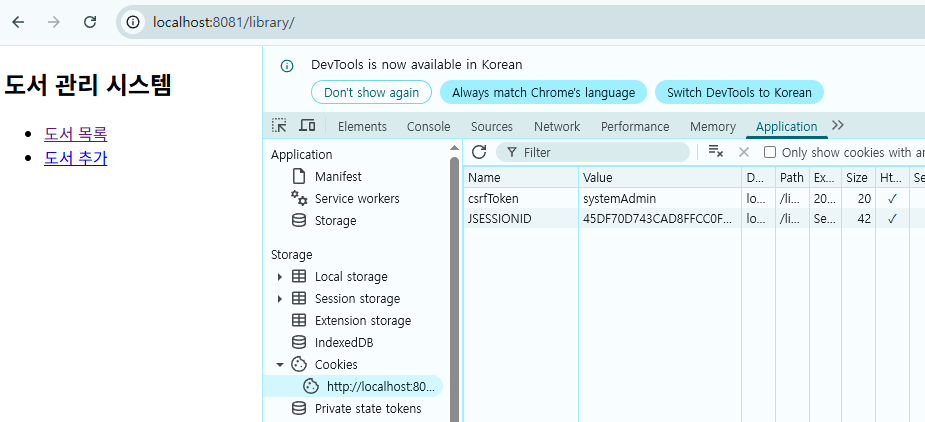
- 메인 페이지로 접근하면 Cookie에 csrfToken이 추가된다.
- 값은 테스트를 위한 임의 값으로 넣었다.
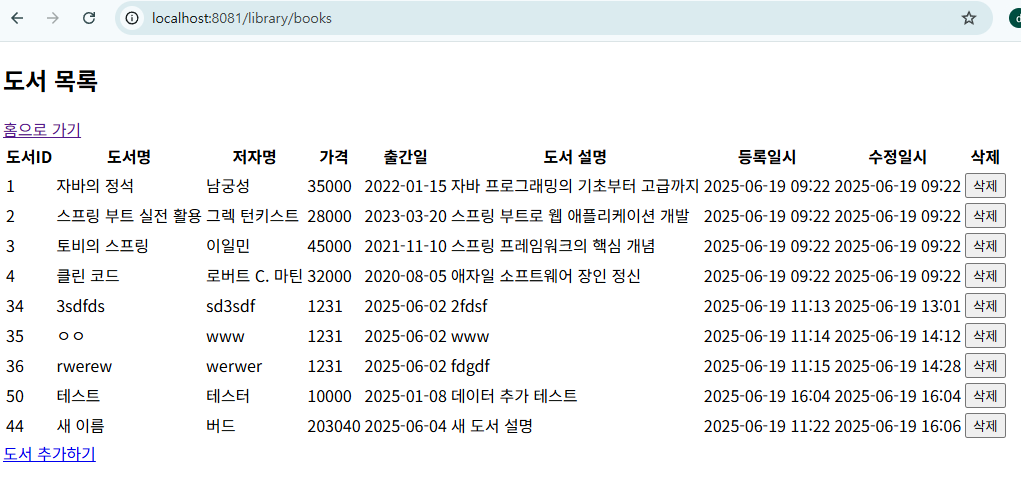
- 목록 페이지에선 저장된 도서를 확인할 수 있다.
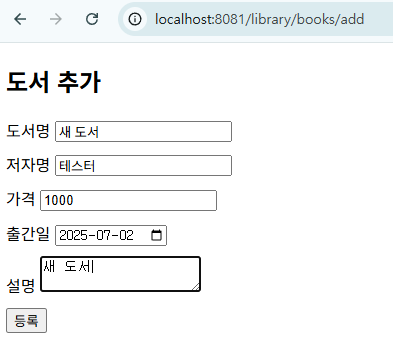
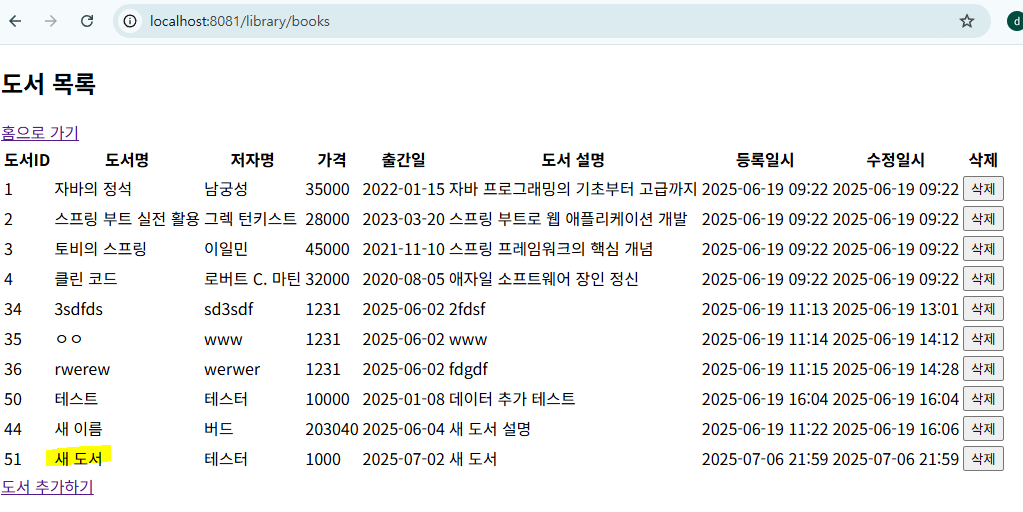
- 도서 추가 페이지에서 도서를 추가하면 도서 목록 페이지에서도 추가한 데이터가 보인다.
- 도서 목록에서 도서를 클릭하면 도서 수정 페이지로 이동하고, 도서를 수정할 수 있다.
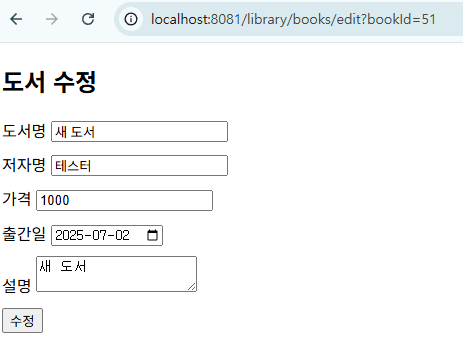
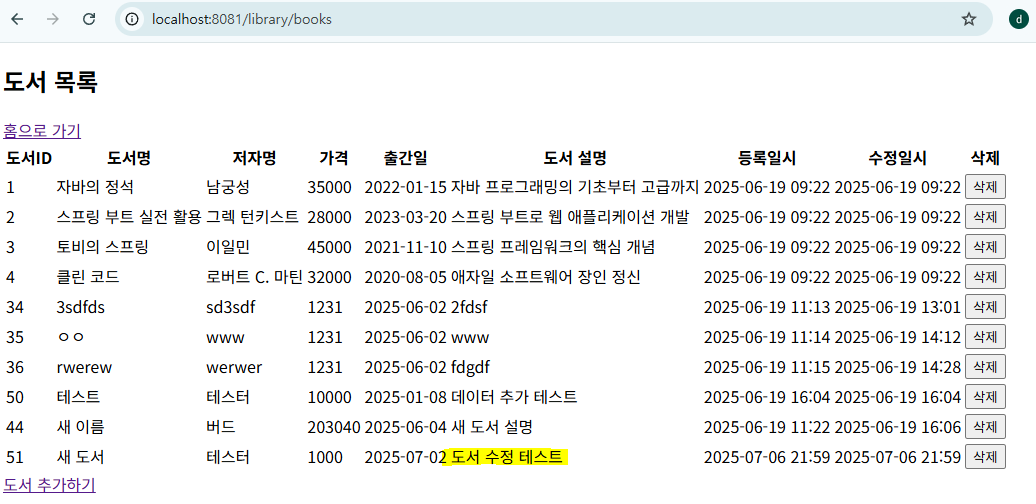
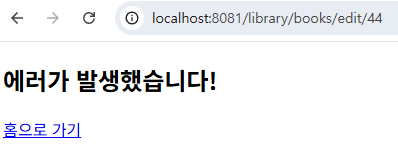
- 만약 메인 페이지에서 CSRF Token을 발급 받지 않고 바로 도서 수정 페이지로 접근하면 에러 페이지로 이동한다.
피드백
- 수업 때 받은 실습 코드와 직접 실습한 코드를 비교했을 때 CSRF Token 부분에서 많은 차이가 있어 정리했다.
- CSRF Token 생성을
SecurityUtil에서 처리한다.SecureRandom를 사용해서 안정적인 난수를 생성한다.- CSRF Token으로 사용할 난수를
byte배열에 저장한다. (256 비트 = 32 바이트) - 난수를 저장하고, 각 바이트를 2자리 16진수 문자열로 만들어 64자 문자 길이의 hex 토큰으로 만든다.
package util;
import java.security.SecureRandom;
import java.util.regex.Pattern;
public class SecurityUtil {
private static final Pattern HTML_TAG_PATTERN = Pattern.compile("<[^>]*>");
private static final Pattern SCRIPT_PATTERN = Pattern.compile("(?i)<script[^>]*>.*?</script>");
private static final Pattern SQL_INJECTION_PATTERN = Pattern.compile("(?i).*(union|select|insert|update|delete|drop|create|alter|exec|execute).*");
// XSS 방지 - HTML 태그 제거 및 이스케이프
public static String escapeHtml(String input) {
if (input == null) return null;
return input.replace("&", "&")
.replace("<", "<")
.replace(">", ">")
.replace("\"", """)
.replace("'", "'")
.replace("/", "/");
}
// 스크립트 태그 제거
public static String removeScripts(String input) {
if (input == null) return null;
return SCRIPT_PATTERN.matcher(input).replaceAll("");
}
// 기본적인 SQL Injection 패턴 검사
public static boolean containsSqlInjection(String input) {
if (input == null) return false;
return SQL_INJECTION_PATTERN.matcher(input).matches();
}
// CSRF 토큰 생성
public static String generateCSRFToken() {
SecureRandom random = new SecureRandom();
byte[] bytes = new byte[32];
random.nextBytes(bytes);
StringBuilder token = new StringBuilder();
for (byte b : bytes) {
token.append(String.format("%02x", b));
}
return token.toString();
}
// 안전한 문자열 검증
public static String sanitizeInput(String input) {
if (input == null) return null;
// 스크립트 제거
input = removeScripts(input);
// HTML 이스케이프
input = escapeHtml(input);
// 앞뒤 공백 제거
input = input.trim();
return input;
}
}
- Servelt에서 페이지 접근 시에 CSRF Token을 생성하고, POST 동작 등을 수행할 때 Token을 검증한다.
- 생성한 CSRF Token은
HttpSession에 저장하고, 검증 시에도HttpSession에 저장된 Token을 가져와 비교한다.
package servlet;

import java.io.IOException;
import java.sql.Date;
import java.sql.SQLException;
import java.util.List;

import javax.servlet.RequestDispatcher;
import javax.servlet.ServletException;
import javax.servlet.annotation.WebServlet;
import javax.servlet.http.HttpServlet;
import javax.servlet.http.HttpServletRequest;
import javax.servlet.http.HttpServletResponse;
import javax.servlet.http.HttpSession;

import dao.BookDAO;
import dto.Book;
import util.SecurityUtil;
import validator.BookValidator;

@WebServlet("/books/add")
public class AddBookServlet extends HttpServlet {
    private static final long serialVersionUID = 1L;

    protected void doGet(HttpServletRequest request, HttpServletResponse response)
            throws ServletException, IOException {

        // CSRF 토큰 생성
        HttpSession session = request.getSession();
        String csrfToken = SecurityUtil.generateCSRFToken();
        session.setAttribute("csrfToken", csrfToken);

        request.setAttribute("currentPage", "addBook");

        RequestDispatcher dispatcher = request.getRequestDispatcher("/WEB-INF/views/addBook.jsp");
        dispatcher.forward(request, response);
    }

    protected void doPost(HttpServletRequest request, HttpServletResponse response)
            throws ServletException, IOException {

        request.setCharacterEncoding("UTF-8");

        // CSRF 토큰 검증
        HttpSession session = request.getSession();
        String sessionToken = (String) session.getAttribute("csrfToken");
        String requestToken = request.getParameter("csrfToken");

        if (sessionToken == null || !sessionToken.equals(requestToken)) {
            request.setAttribute("errorMessage", "잘못된 요청입니다.");
            RequestDispatcher dispatcher = request.getRequestDispatcher("/WEB-INF/views/error.jsp");
            dispatcher.forward(request, response);
            return;
        }

        // 입력값 받기 및 보안 처리
        String title = SecurityUtil.sanitizeInput(request.getParameter("title"));
        String author = SecurityUtil.sanitizeInput(request.getParameter("author"));
        String priceStr = request.getParameter("price");
        String publishDateStr = request.getParameter("publishDate");
        String description = SecurityUtil.sanitizeInput(request.getParameter("description"));

        // 입력값 검증
        List<String> errors = BookValidator.validateBook(title, author, priceStr, publishDateStr, description);

        if (!errors.isEmpty()) {
            request.setAttribute("errors", errors);
            request.setAttribute("title", title);
            request.setAttribute("author", author);
            request.setAttribute("price", priceStr);
            request.setAttribute("publishDate", publishDateStr);
            request.setAttribute("description", description);
            request.setAttribute("currentPage", "addBook");

            RequestDispatcher dispatcher = request.getRequestDispatcher("/WEB-INF/views/addBook.jsp");
            dispatcher.forward(request, response);
            return;
        }

        try {
            // Book 객체 생성
            Book book = new Book();
            book.setTitle(title);
            book.setAuthor(author);
            book.setPrice(Integer.parseInt(priceStr));

            if (publishDateStr != null && !publishDateStr.trim().isEmpty()) {
                book.setPublishDate(Date.valueOf(publishDateStr));
            }

            book.setDescription(description);

            // DAO를 통해 도서 추가
            BookDAO dao = BookDAO.getInstance();
            boolean success = dao.addBook(book);

            if (success) {
                session.setAttribute("successMessage", "도서가 성공적으로 추가되었습니다.");
                response.sendRedirect(request.getContextPath() + "/books");
            } else {
                request.setAttribute("errorMessage", "도서 추가에 실패했습니다.");
                RequestDispatcher dispatcher = request.getRequestDispatcher("/WEB-INF/views/error.jsp");
                dispatcher.forward(request, response);
            }

        } catch (SQLException e) {
            e.printStackTrace();
            request.setAttribute("errorMessage", "데이터베이스 오류가 발생했습니다.");
            RequestDispatcher dispatcher = request.getRequestDispatcher("/WEB-INF/views/error.jsp");
            dispatcher.forward(request, response);
        } catch (Exception e) {
            e.printStackTrace();
            request.setAttribute("errorMessage", "예상치 못한 오류가 발생했습니다.");
            RequestDispatcher dispatcher = request.getRequestDispatcher("/WEB-INF/views/error.jsp");
            dispatcher.forward(request, response);
        }
    }
}